The best outdoor security cameras without subscription aren’t that easy to find. Today’s review article is going to be of high value if you are looking for one.
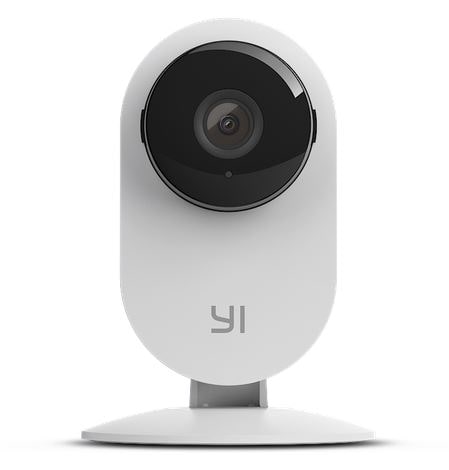
We’ll be reviewing in detail the YI 4pc home outdoor camera. The best thing? It doesn’t require you to pay a subscription fee for the storage, you’ll just have to buy it once.
Plus, the YI cam comes at an affordable price, not like other camera systems whatever Arlo, blink, google nest cameras, and reolink.
By the end of this article, you’ll have a good insight into the features, pros, and cons of one of the best outdoor security cameras without subscription. This will make your decision a well-informed one.
Let’s get right into the details.
Outdoor Security Cameras Without Subscription | YI 4pc Home Outdoor Camera
In previous posts we list 5 best cameras with no monthly fees you can read before go deep in YI camera review.
Let’s first discuss
Features and Benefits
1. Resolution
The 1080p resolution of the security camera delivers clear and crisp visuals, keeping everything in the view discernible.
YI camera is equipped with a wide-angle lens (120 degrees), covering most of the surroundings and leaving virtually no blind spots.
Resolution of YI cam is enough to see everything happens around your home, it’s feed videos like pro cameras.
In addition, the Y1 camera allows you to have a live feed of 9 cameras at a time on one screen. This enables you to monitor every room of your home or business in one place.
2. 2-Way Audio
Two-way audio lets you communicate with your loved ones at home from anywhere. Not only that, but you can have clear two-way conversations with a guest at the door or command your pet at home.
Most people like this advantage as it allows them to talk naturally to delivery man, and stranger without having to see him face to face.
3. Alert Notification
Besides being one of the best outdoor security cameras without subscription, the YI camera has a smart alert notification system.
Whenever there is an activity, the cam sends a notification to your phone. So, you know what’s happening at your door all the time.
Note: Optional emergency service is available 24/7 to send you help in an emergency like a fire or a robbery. So, you can go out without worrying too much.
4. Best For Baby Monitoring
A prominent feature of the YI security camera is baby cry detection. You can leave your baby at home and keep a constant tab on her with this amazing feature.
Whenever your baby starts crying, the smart algorithm of the cam sends a notification on your phone, allowing you to get back home or send someone else to take care of the baby.
5. Night Vision
What’s more, the advanced night vision of the Y1 4pc provides clear visuals at night, enabling you to monitor your child.
On top of that, the IR glare and the LED won’t disturb the child. By using 8 enhanced LED with 940nm which work automatically in low light conditions.
6. Wireless Security Camera
For power, the YI camera not like wireless or wire-free cameras that powered by a battery, it’s a wired camera power by an electric source. So, in the installation of the camera make sure it’s near to the power outlet.
In transferring data, the YI security camera sends and receives data using a wifi signal, it’s an IP camera.
7. Easy To Setup
The camera is quite easy to set up. You won’t need any expertise or special tools to install it outdoors. The Installation Process of the YI security camera is super easy.
Just follow the steps in the user guide provided with a camera package to know where to mount and the best place to install it.
8. Weather Resistant Camera
The build of the camera is sturdy and weather-resistant, making it ideal for outdoor/ indoor use wherever you love.
9. No Subscription Monthly Fee
Apart from effective security features, the best thing about the camera is that you don’t have to pay a monthly subscription fee to use those features. The camera also doesn’t come at a high price point.
Moreover, you won’t have to worry about losing your camera footage. The Y1 cloud stores your videos virtually for 1 day, so you can access them in case the camera gets broken.
As an additional option to increase your storage space, You can also buy an SD card separately and store all footage there. So, your video clips are stored in a safe place.
10. Friendly Mobile App
YI Security Camera offers an intuitive and user-friendly Y1 app that keeps things integrated and fun. You can monitor and adjust the settings of all your home cameras right from the Y1 smartphone app easily.
Setting up the camera with your mobile app will also be no hassle. There is a step-by-step guide on the product page on how to do that.
Cons
· The sensor of the camera can be a little too sensitive, so install it at a location where there is normally no activity.
· The video footage’s don’t show a date/time stamp

Pros
- Secure Cloud Storage
- Continously Working
- Durable Material

Cons
- High Sensor Senstivity
Summary
This was a thorough review of the best outdoor security cameras without subscription. The Y1 4pc outdoor camera features everything a security camera should, without requiring any subscription fee.
It’s weather-resistant, so you can install it outdoors with peace of mind. The wide-angle lens covers most of the surroundings. You get security alerts for every small motion on your smartphone.
There is two-way audio to interact with your loved ones at home. Plus, the camera offers a 24/7 emergency service when you are away from home.
All in all, the Y1 4pc is a reliable camera for your home’s security; Its amazing features make it one of the best outdoor security cameras without subscription.
Source: YI Technology, Safebudgets
Comments
Post a Comment